We use Facebook, Twitter, Instagram, Pinterest, and YouTube regularly to curate our research outcomes. We have experimented with and tested different strategies, trends, and media types for many years. However, our main takeaway is the importance of conducting audience research, continually adjusting your strategy based on which practices you find most effective, and framing your social media strategy around these findings. Based on our lessons learned, we have come up with a series of best practices for communicating academic research.
We joined Twitter in 2012 and primarily use it as a tool to disseminate our research outcomes, curate content, and to conduct social listening. It is a great platform to circulate information widely, identify hashtag communities, and speak directly to other users. Furthermore, its fast-paced nature helps illuminate topical conversations or news items.
Ensure you post regularly however avoid posting all at once.
Use hashtags to expose yourself to a wider audience, but always investigate a hashtag before using it as you do not want to misconstrue your message.
Avoid overusing hashtags. When appropriate, use 1-3.
Pay attention to trending hashtags and use them strategically.
Look for and listen to existing conversations to join, as it is much easier to join a conversation than start one.
Twitter is community oriented, therefore show your support by following other users as well as retweeting and liking content their content.
Since Twitter moves at a fast pace, reply to tweets quickly.
We joined Facebook in 2010 and primarily use it to disseminate our research outcomes, curate content, circulate videos, and run modest paid ads. Since we built up our following before Facebook made major changes to their algorithms to limit the organic reach (posting without the use of paid ads) of ‘brand’ pages, we have a modest yet consistent fan base. Despite this limitation, we have learned that consistent and strategic scheduling will ensure that your posts reach a subset of your following. We also use paid ads (typically under $25) to promote new articles, videos, reports, etc. This not only helps us break through our filter bubble, but also provides us with a new subset of data. However, it is important to consider privacy concerns and data collection prior to joining this platform.
Less is often more when it comes to Facebook, therefore we suggest you post consistently but not as frequently as Twitter.
Use Facebook as an additional video hosting site. In addition to YouTube or Vimeo, upload your videos to your Facebook video playlist. This will help circulate your videos to a wider audience as Facebook privileges this content type. Simply sharing your video from YouTube or Vimeo on to Facebook will limit its reach.
With the introduction and constant evolution of algorithms, you can only engage so many users through organic reach. Schedule affordable paid ads (under $25) to promote new publications, videos, reports, data visualizations, or upcoming events to thousands of potential users.
Consider joining or starting a Facebook group. This will help you find like-minded users and provide you with an existing space to share content and engage in dialogue.
Avoid using hashtags on Facebook.
Since Facebook allows for lengthier posts than Twitter, consider sharing quotes from articles.
We joined Instagram in 2017 to test how images can be used to communicate academic research. As an incredibly powerful and popular platform, it boasts 1 billion users worldwide and has a wide reach. It is, however, very different from Twitter and Facebook. As it is an image-based platform, you cannot share links unless you have thousands of followers, which is why you need to harness the power of visuals in combination with hashtags. Instagram is owned by Facebook, therefore you should consider privacy and data usage prior to opening an account.
Post only high-quality images, videos, or stories.
Research appropriate hashtags. Avoid using hashtags that are not relevant to your content.
You can use up to 30 hashtags for each post to maximize reach. Do not use the same hashtags multiple times in a row as Instagram algorithms may think you are spamming the feeds. Post hashtags as a comment to avoid using up the caption character count.
Instagram will limit the reach of your content if you do not follow their community rules. Only post open-source or creative commons images or get permission to use images or artworks. Avoid the use of bots to comment and like other user content, vary your hashtag use, and avoid using third-party apps to post on Instagram.
If you want to share a link, paste it into your account description and direct to your profile.
Use a narrative framework when writing captions. Consider posting abbreviated versions of your blog content.
It is difficult to boil down academic research outcomes into short excerpts. Treat Instagram like your blog. Experiment with different description lengths and styles.
Ensure all videos are 60 seconds or less.
Harness the power of Instagram stories. Use stories to talk about your research outcomes as this will help personalize your research and put a face behind the work.
As an image-based platform, our Pinterest account helps us establish a visual footprint online by integrating our pins into image searches via Google, Bing, Duck Duck Go, etc. It is a relatively low-maintenance platform as pins continue to generate engagement with little work. We joined Pinterest in 2016 and use our boards as visual collages linking to saved resources—including articles, videos, reports, art projects, etc. We also use it as a tool for classroom engagement. Consider creating a collaborative board that functions as a library for students to share ideas and resources. See Sustainability Studio: Poetry in Motion as an example of a collaborative student board.
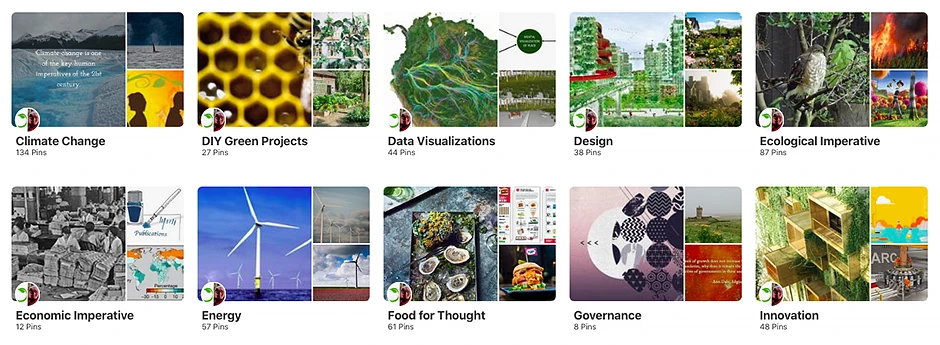
Figure 8: CRC Research’s Pinterest profile
Pin images from your website to ensure connectivity.
Verify your website on Pinterest to ensure it collects analytics.
Give your boards topical titles based on Pinterest search terms to make them more discoverable.
Write pin descriptions that are 200 words or less and include keywords.
Engage with others by following their boards and saving their pins.
Embed Pinterest boards on webpages to help direct users to your Pinterest account and to act as a visually engaging form of media.
Install the browser button on your website to encourage users to share images.
We joined YouTube in 2011 and named our channel HEADTalks (Humanities, Education, and Design). Our goal was to experiment with social media for research dissemination and to present our research outcomes in a different format. While YouTube best practices have changed considerably over the years, our main strategy is to personalize our research and to make complex ideas more understandable. Furthermore, we add a level of creative depth to our research through animation. For detailed best practices, visit Hootsuite’s complete guide to YouTube.
Videos have become increasingly vital for social media communications. When done well, they are highly engaging, easy to absorb, and are a great medium to harness the power of storytelling. With many different creative directions to take, videos can communicate research using art, music, visualizations, animations, and footage—see our video What is Spatial Justice? as an example. YouTube (and other video platforms) helps circulate video content and generates embeddable links that make it easy to share on website(s).
Keep your videos under 1-3 minutes to optimize engagement. If you are posting it on Instagram, ensure you make it 60 seconds or less. See What are the co-benefits of climate action? as an example.
Make sure the first 10 seconds are captivating. Your viewers may not watch the full video as attention spans online are short, therefore use the first few seconds wisely.
Keep information high level. Don’t get into the nitty-gritty details. Encourage viewers to learn more by clicking on a hyperlink in the video caption.
Ensure footage, images and sound are high quality, since viewers tend to navigate away from poor quality videos whether the content is of interest or not.
Tell a compelling story in your video. This helps viewers relate to your content by eliciting an emotional response.
Use captivating visuals or even consider collaborating with an artist.
Ensure any images you use are open source, licensed, or that you have received written approval for use. If the license requires recognition of the creator, include these details in the end credits.
Subtitles help viewers who have hearing loss, are hearing impaired, and whose second language is English. Furthermore, they make videos easier to follow, which is especially important when presenting academic research.
Include a call to action at the end of the video. Since you are promoting your research, encourage viewers to learn more about your information by clicking on a link.
Embed your videos on your website. This will enhance your webpage content while encouraging users to visit your YouTube Channel.
Promote your YouTube channel on other social media platforms. This will encourage users to visit your channel.